"I want to talk to that person, but I don't know what to say..."
You found a band you liked on a recruitment page. You looked at their profile and thought, "I want to play with this person." But then you realized their profile was in English. Or Chinese. —Have you ever given up on sending a message at that moment?
I moved to Tokyo in my twenties and started a band based at Mandara in Kichijoji. I also frequented UZU in Fussa and met dozens of musicians. Of course, some of them were foreigners. When you play music together, you don't need words—that's half true. In the moment of a session or a live performance, you can communicate just through sound.
But that first line, "Would you like to do it together?", is the hardest part.
"Where's a good place to practice?" "What kind of music do you like?" "Are you free next Sunday?" — In the everyday conversations necessary for band activities, you run into language barriers. Opening a translation app and copying and pasting every time is troublesome, and often the nuances don't get conveyed.
Membo's translation chat feature was created to remove those barriers with just one tap.
How to use translation chat — language barriers disappear with just one tap
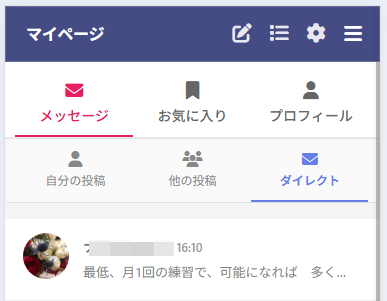
First, open the message screen from your My Page. The Direct tab will display a list of the people you are currently communicating with.
Tapping on the other person opens the chat screen. What you should pay attention to here is the globe icon at the top of the screen .

It's simple to use. Just tap the globe icon once. That's all it takes to automatically translate the other person's message into your language. Once you turn it on (a checkmark will appear on the icon), all messages you receive from them will be automatically translated from then on. There's no need to operate it manually each time.
Translation chat from a Japanese user's perspective
Let me show you the actual screen. Here, a Japanese user and a Taiwanese user are having a conversation.
Translation OFF — The other person's language will be displayed as is.
When translation is turned off, messages from Taiwanese users will be displayed in Taiwanese (Traditional Chinese).
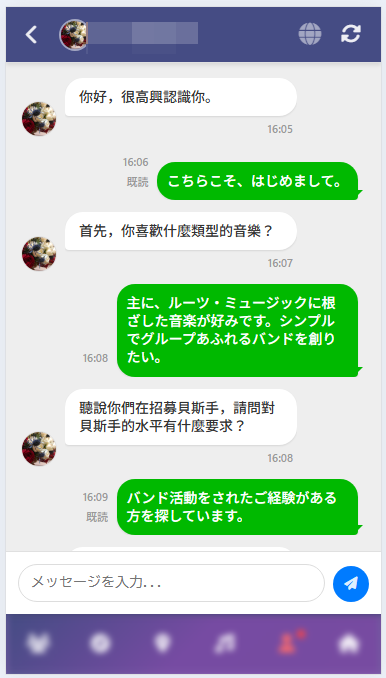
"Hello, I'm happy to have met you." "First of all, what kind of music do you like?" — For someone who doesn't understand Taiwanese (Traditional Chinese), this makes absolutely no sense.
If you tap the globe icon here—
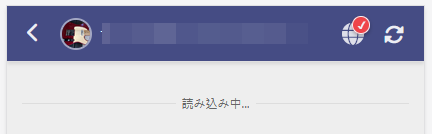
Translation ON — Readable in Japanese!
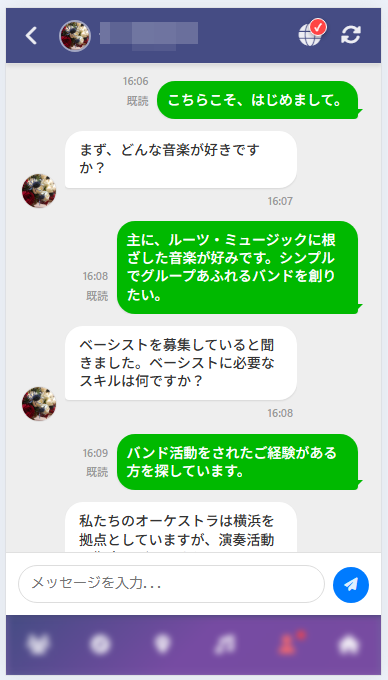
"Nice to meet you too." "First of all, what kind of music do you like?" "I heard you're looking for a bassist. What skills are required for a bassist?" — The Taiwanese (Traditional Chinese) messages that I couldn't read just moments ago have now become natural Japanese.
Your own Japanese messages (in green speech bubbles) remain unchanged. Only the recipient's messages are translated. Therefore, you can see at a glance which messages have been translated.
Translation chat from the perspective of a Taiwanese user
Now let's look at the same conversation from the perspective of a Taiwanese user. The translation chat works in both directions .
Translation OFF — Japanese will be displayed as is.
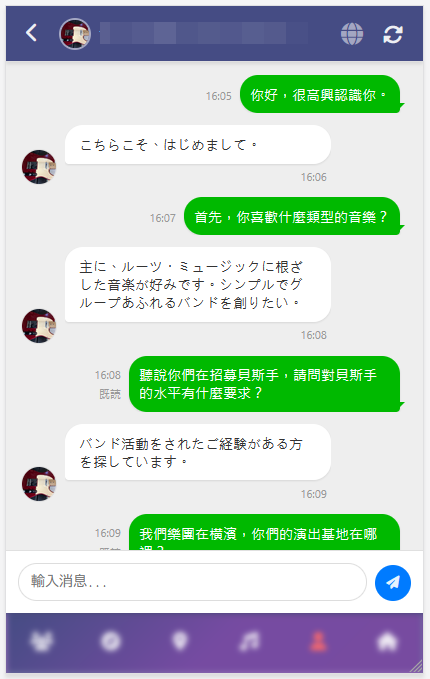
From the perspective of a Taiwanese user, messages sent by Japanese people, such as "Nice to meet you too," and "I mainly like music rooted in roots music," are displayed in Japanese. If you don't understand Japanese, a conversation is impossible.
Similarly, if you tap the globe icon—
Translate ON — Readable in Taiwanese (Traditional Chinese)!
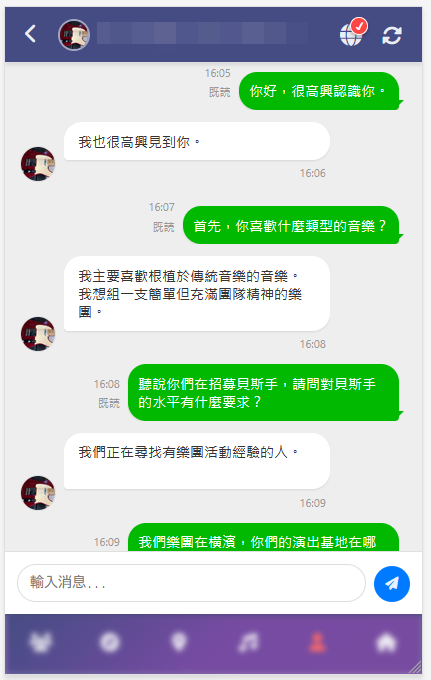
``I'm here to see you.'' ``I'm here to see you.'' ``My main joy is to listen to traditional music. Gaso-gumi's one branch is simple, but the spiritual music of the group is spiritual.'' - Japanese written by a Japanese person is translated into Taiwanese (traditional Chinese) and displayed.
Everyone can write in their own language and read in their own language. That's Membo's translation chat.
PWA compatible — Receive notifications from the home screen
Membo supports PWA (Progressive Web App) . By adding an icon to your smartphone's home screen, you can use it like a native app.
And if you have push notifications enabled—
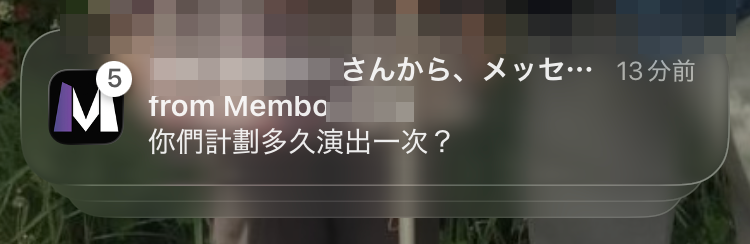
When you receive a message from someone, you'll get a notification on your smartphone even if you don't have the app open. You'll never miss an important message. "Studio schedule change," "Today's rehearsal location"—you can receive essential communication for your band activities in real time.
Multilingual support — You can converse in any combination of languages.
Membo's translation chat supports the following languages :
| language | Notation |
|---|---|
| Japanese | Japanese |
| English | English |
| Simplified Chinese | Simplified Chinese |
| Taiwanese (Traditional Chinese) | Traditional Chinese |
| Korean | Home |
| Vietnamese | Tiếng Việt |
| Nepali | नेपाली |
| Hindi | हिन्दी |
Translation chat is available not only between Japanese and English, but also between Korean and Vietnamese, Nepali and Taiwanese (Traditional Chinese)—any combination of languages.
The number of foreigners active in the Japanese music scene is increasing year by year. They can be found not only in Tokyo, but also in Osaka, Nagoya, and Fukuoka. In particular, the communities of Vietnamese and Nepalese people living in Japan are growing rapidly, and many are seeking connections through music.
Membo is a service created to facilitate encounters between musicians of different nationalities , without language barriers.
Comparison of Membo with other member recruitment services
While there are several services for finding band members, only Membo has a built-in multilingual translation function. If you're serious about finding foreign band members, this difference is crucial.
| service | Translation Chat | Supported Languages | Fee | Features |
|---|---|---|---|---|
| Membo | ✅ Real-time translation | multilingual | Completely free | Multilingual support, PWA, push notifications |
| OURSOUNDS | ❌ None | Japanese only | free | One of the largest in Japan (650,000 monthly users) - Japanese only |
| bandcrew | ❌ None | Japanese only | free | Bulletin board type (33,000 monthly page views) |
| BandMix.jp | ❌ None | English-based | Paid (monthly subscription) | For overseas and English-speaking audiences. |
| SNS (X, etc.) | ❌ None | — | free | Searching is difficult and communication tends to get lost in the stream. |
OURSOUNDS is the largest domestic service with 650,000 monthly users, but it only supports Japanese. Bandcrew is a bulletin board type service with 33,000 monthly page views, and is also Japanese-only. BandMix.jp is English-based and subscription-based. None of these services have a function to bridge the gap between Japanese and foreign languages in real time.
A detailed comparison of each service can be found in "A Thorough Comparison of Band Member Recruitment Websites and Apps [2026 Edition]" .
Membo's basic functions and how to get started
Membo is a completely free service for recruiting members for bands, theater groups, and clubs. In addition to translation chat, all of the following features are available free of charge.
Main Features
- Recruiting and searching for members —filter by genre, part, and region. Cross-search job postings in multiple languages.
- Multilingual real-time translation chat —the feature introduced in this article. Automatic translation with one tap.
- Profile privacy settings —manage your privacy settings precisely. You can operate without revealing your real name.
- PWA compatible —add it to your home screen and use it like an app. Never miss an important message with push notifications.
- Map-based search — Find members who are active nearby on a map.
How to get started — 3 steps
- Free membership registration —registration is complete with just your email address. No credit card required.
- Search for members — Find members you're interested in by genre, part, or area.
- Communicate via translated chat —you can converse in your own language, no matter what language the other person speaks.
Detailed instructions, including images, on how to add the app to your home screen and how to set up push notifications are available on the user guide page.
Practical Guide to Activities with Foreign Members
Once you've made initial contact via translated chat, the next step is actual band activities. As mentioned in our article on how foreigners can find band members in Japan , here we'll summarize the specific steps involved in using translated chat.
Studio booking communication
When practicing in a studio with foreign members, the first hurdle is communicating about reservations. With a translation chat, this kind of exchange can be communicated directly.
- "I managed to book a 3-hour session at Noah Studio on Saturday at 2 PM."
- "I've booked a studio with a drum set. There are two Marshall guitar amps."
- "I'll send you the studio address. The nearest station is XX Station, a 5-minute walk away."
Studio names and station names are proper nouns, so they will be conveyed as is without being translated. The trick is to include the address or station name in the message so that the recipient can easily search for it using a map app. For information on how to choose a studio and typical prices, please refer to the guide on choosing a band practice studio .
Adjusting the practice schedule
Coordinating band practice schedules is difficult even among Japanese members, but it becomes even more confusing when there are language barriers. Here are some tips for coordinating schedules using translation chat.
- Dates and times should be written in numbers— "March 29th (Sat) 14:00-17:00" is more accurate than "next Saturday."
- Present 2-3 options—for example, "March 29th or March 30th, which is better?"
- Once decided, repeat it back to yourself— "OK, confirmed, Saturday, March 29th, 2:00 PM, at Noah Studio Shinjuku!"
Translation is never perfect. That's why organizing information with numbers, proper nouns, and bullet points ensures accurate communication regardless of the language.
Sharing of items to bring on the day of practice
You can also share lists of things to bring and prepare using the translated chat.
- "Guitar, cable, tuner, pick, lyric sheet"
- "There's a drum set in the studio, but you'll need to bring your own drumsticks."
- "We don't need a PA system. We can do it with the studio equipment."
Many instrument and equipment names use universally recognized terminology, making translation less prone to misunderstandings. Using specific item names ensures clear communication.
Take your first step using translation chat.
For those who hesitated to send a message simply because the recipient was a foreigner, there's no need to hesitate anymore.
If only there was a translation chat—
- No matter what language the other person writes in, I can read it in my own language.
- I should write in my own language. The other person can read it using translation.
- Once you turn on translation, it will be automatically translated from then on. You only need to do it the first time.
Nationality and language don't matter. Starting a session or band where music connects you all is easier than ever. That's Membo's translation chat.
If you don't have an account yet, please start by registering for a free account . You can also find information on how foreigners can find band members in Japan , and a complete guide to starting a band this spring .