Add Membo to
Your Home Screen
Access with one tap without opening the browser.
You can also receive notifications.
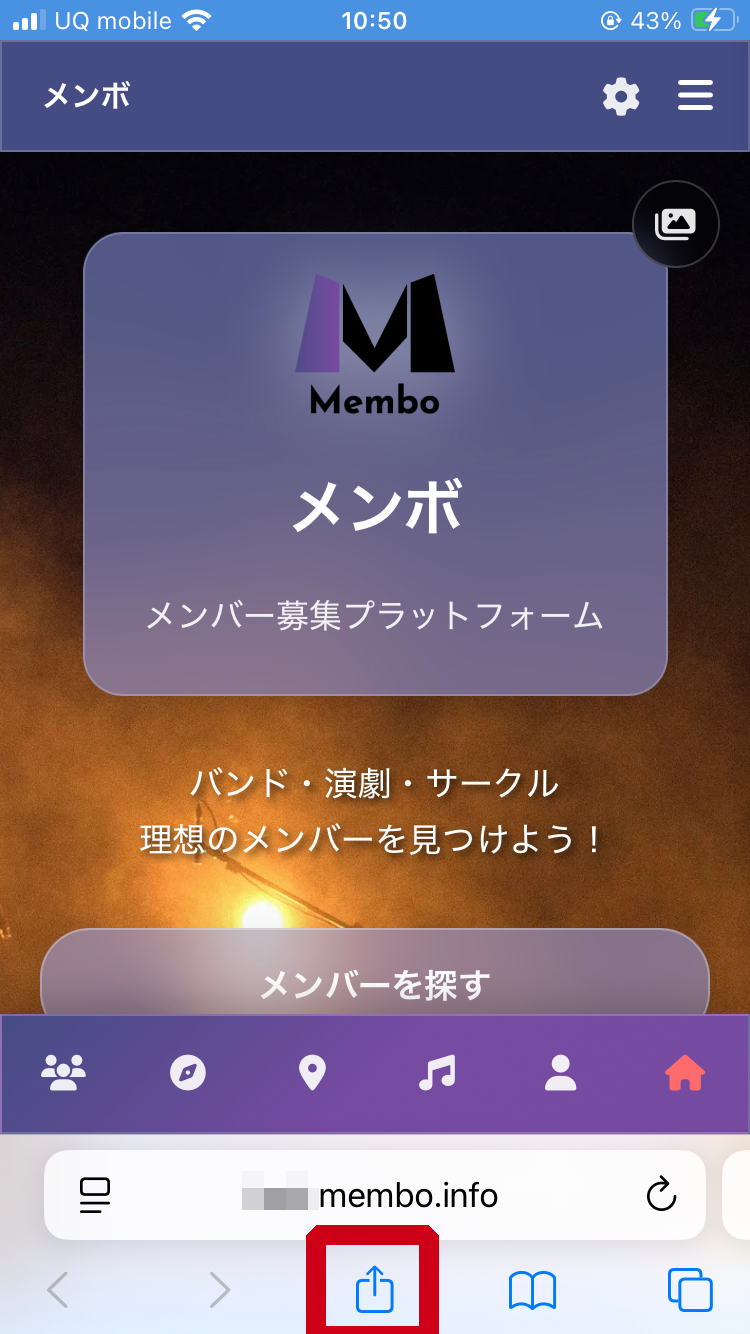
Tap the Share button
Tap the Share icon (square with up arrow) at the bottom of the screen
640 × 400px
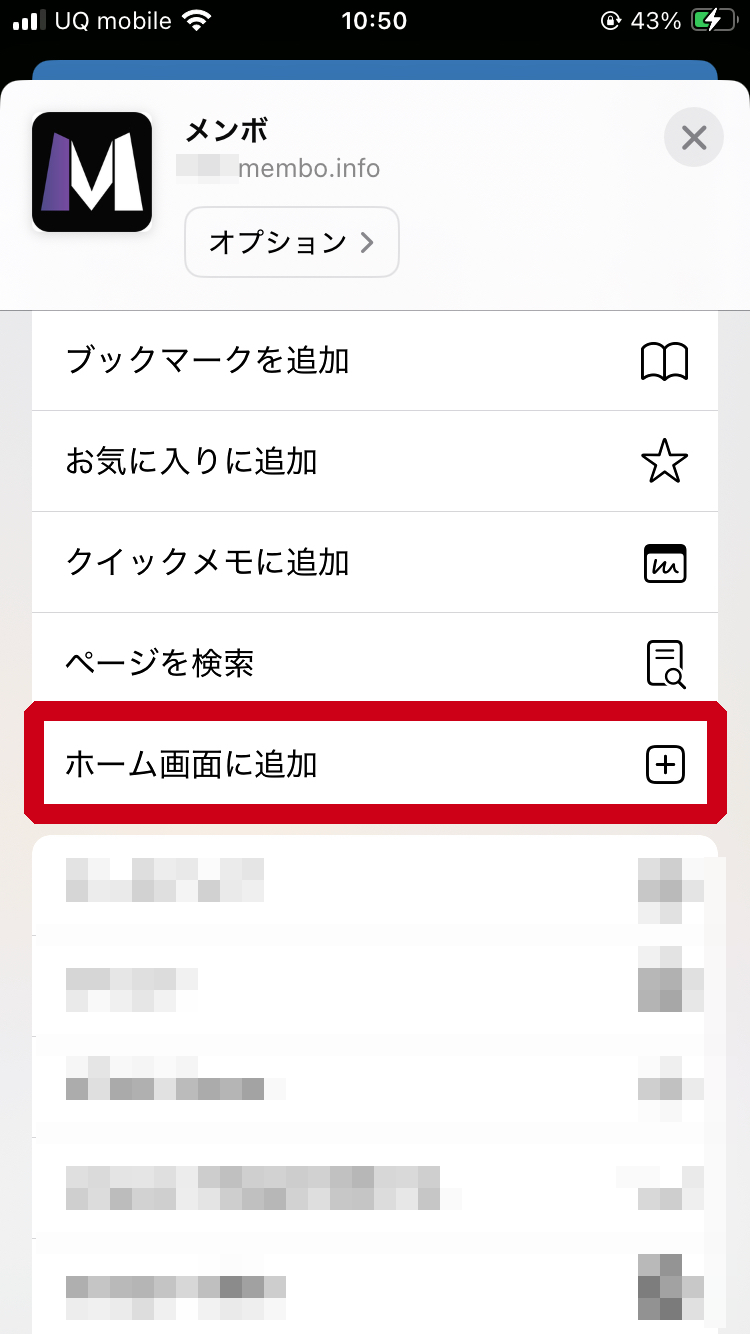
Select "Add to Home Screen"
Scroll down the menu and tap "Add to Home Screen"
640 × 400px
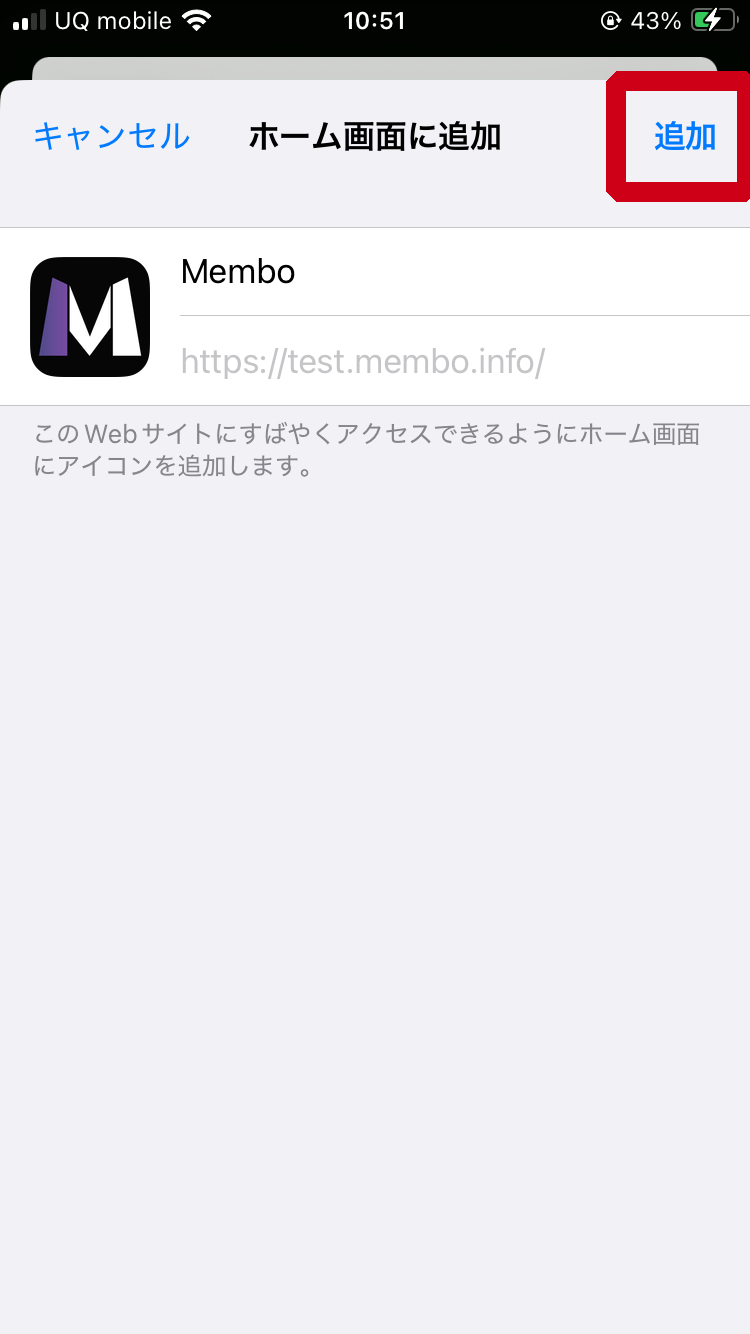
Tap "Add" to complete
Tap "Add" in the top right to complete installation
640 × 400px
Icon has been added to your home screen!
Tap it to launch the app.
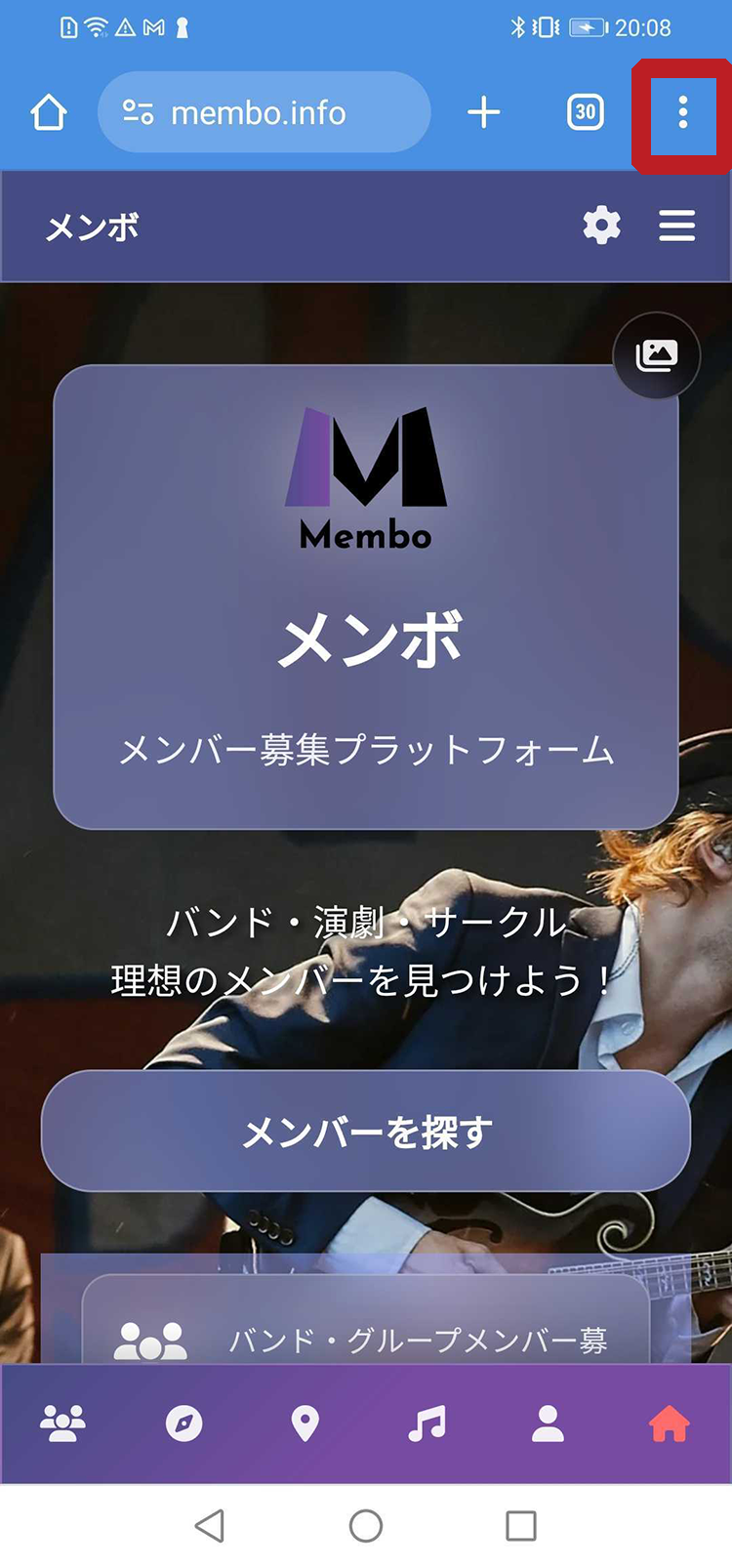
Open the menu
Tap the three-dot menu (︙) in the top right corner
640 × 400px
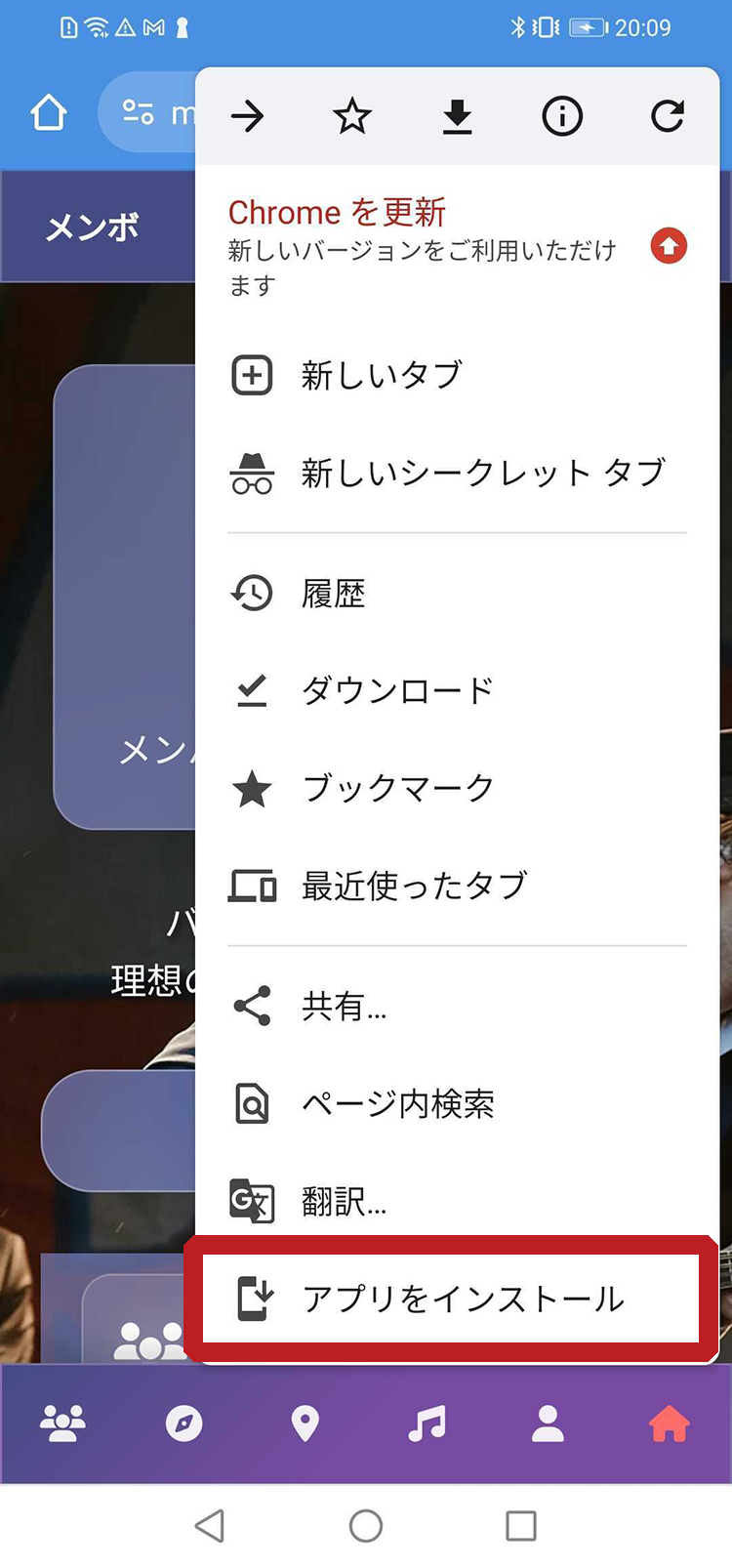
Tap "Install app"
Select "Install app" or "Add to Home Screen" from the menu
640 × 400px
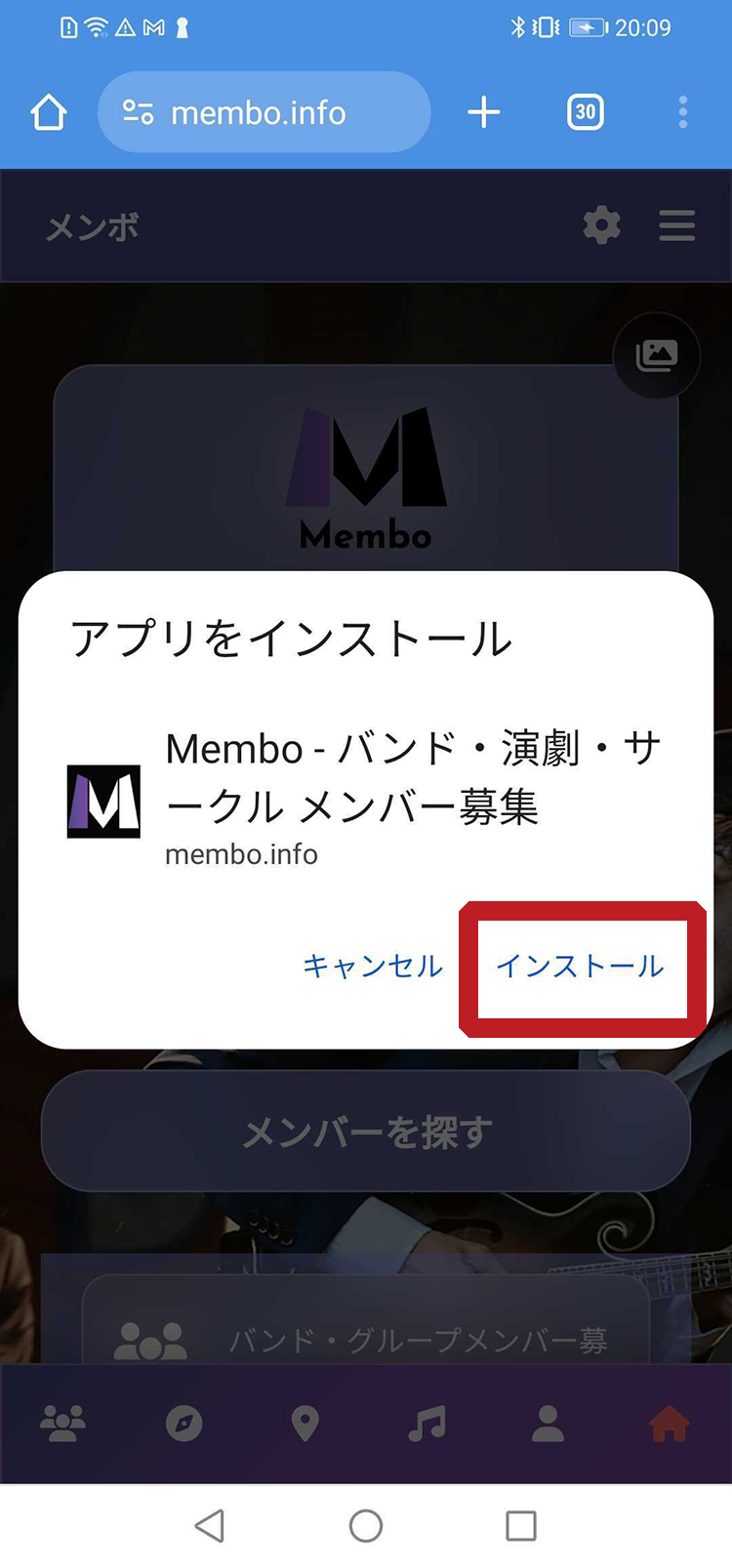
Tap "Install"
Tap "Install" in the confirmation dialog to complete
640 × 400px
App has been installed!
Launch it from your home screen or app list.
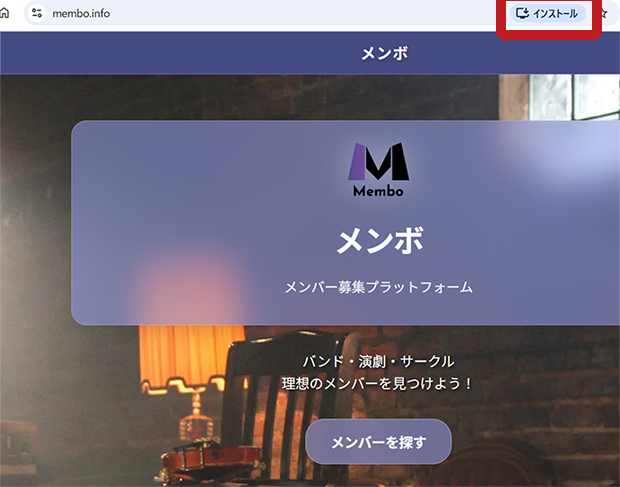
Click the install icon
Click the install icon (+ mark) on the right side of the address bar
800 × 450px
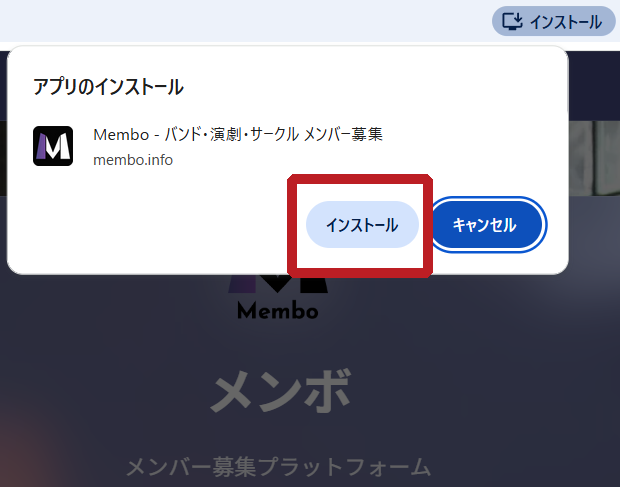
Click "Install"
Click the "Install" button in the dialog that appears
800 × 450px
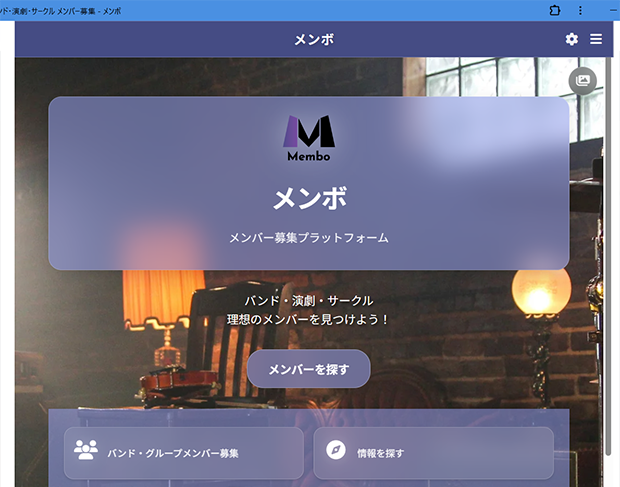
App launches
After installation, the app will automatically launch in a standalone window
800 × 450px
App has been installed!
Launch it from your desktop or start menu.
FAQ
How is this different from a regular app?
You can get almost the same experience as apps downloaded from the App Store or Google Play. It also uses very little storage space.
How do I uninstall it?
Just like regular apps, you can delete it by long-pressing the icon. On PC, go to "Settings" and select "Apps" to uninstall.
Can I use it offline?
Some features are available offline. However, an internet connection is required for data synchronization.
What is a PWA? — Web Technology That Works Like an App
A PWA (Progressive Web App) is a modern web technology that lets you use a website just like a smartphone or desktop app. No need to install from the App Store or Google Play — simply add it to your home screen from the browser for a native app experience.
Traditional Website vs. PWA
Traditional Website
Open browser and type the URL every time. Pages load slowly and cannot be viewed offline.
PWA (Membo)
Just tap the icon on your home screen. Fast loading, push notifications, and partial offline support for a seamless experience.
Native App
Requires installation from app store. Uses device storage and requires downloads for each update.
3 Benefits of Using Membo as a PWA
No Installation, Zero Storage
No App Store or Google Play needed. Add to your home screen in a few taps — uses no phone storage.
Always Up-to-Date
No waiting for app store updates. The latest version loads automatically every time you visit.
Push Notifications — Never Miss a Message
Get real-time notifications for new recruitment posts and chat messages. Never miss an opportunity.
Membo's 8-Language Support — Breaking Language Barriers
Membo is Japan's only member recruitment service fully supporting 5 languages. From menus and recruitment posts to chat messages — everything works multilingually.
Supported Languages
Real-time Translation Chat
Send a message in your language and it is automatically translated for the recipient. No translation button needed. Even musicians who don't speak Japanese can communicate freely with Japanese band members.
Multilingual Recruitment Posts
Write your recruitment post in Japanese and it's automatically translated into 5 languages. Reach international communities in Japan with a single post.
Fully Localized Interface
All menus, buttons, and error messages are available in 5 languages. First-time foreign users can navigate without confusion.
Features Available Offline
Membo's PWA uses Service Worker to cache key data. Even with unstable internet connection, you can use the following features.
View Previously Browsed Listings
Recruitment pages you've visited before can be viewed offline. Read interesting listings on the train or underground.
Check Your Profile
View your own profile and saved information offline.
Music Spot Map (Cached)
Music spot data you've loaded is cached for faster map re-display.
* Sending messages and posting new listings require internet connection. Content created offline will be sent when connection is restored.
Band Member Recruitment Service Comparison — Why Choose Membo
| Feature | Membo | OURSOUNDS | BBS |
|---|---|---|---|
| PWA/App | ○ PWA | ✕ | ✕ |
| Multilingual | ○ 8 | ✕ | ✕ |
| Translation Chat | ○ | ✕ | ✕ |
| Map Search | ○ | ✕ | ✕ |
| Push Notifications | ○ | ✕ | ✕ |
| Offline Support | ○ | ✕ | ✕ |
| Price | Free | Free | Free |
Membo is the only member recruitment service in Japan that combines 5-language support, translation chat, map search, and PWA offline capability. It enables connections with international musicians that other services simply cannot offer.
How to Use Membo PWA in Your Daily Life
Search During Your Commute
Launch from your home screen with one tap on the train. Check new listings and message interesting members right away. Push notifications ensure you never miss a reply.
Between Studio Sessions
Thinking "we need a drummer" during practice? Open Membo on the spot. Map search might help you find musicians near your studio.
Share with International Friends
If your foreign friend in Japan needs band members, just send them the Membo URL. No app store download needed — they can open it in their browser and use it in their native language.
Sync Across Devices
Access from smartphone, tablet, or PC. Browse on your phone while commuting, then switch to your PC's big screen at home — same account, seamless experience.
Frequently Asked Questions About PWA
What is the difference between a PWA and a native app?
A PWA runs on browser technology, so no installation from App Store or Google Play is needed. Just add it to your home screen to use it like an app. Membo's PWA provides notifications, offline viewing, and fast loading — comparable to native apps.
Is Membo's PWA free?
Yes, it is completely free. Adding to your home screen and using all features costs nothing.
Which languages are supported?
Membo supports 5 languages: Japanese, English, Chinese (Simplified/Traditional), and Korean. Menus, listings, and chat are all multilingual.
What can I do offline?
You can re-view previously browsed listings and your profile. Sending new messages or posting listings requires internet, but they sync automatically when connection is restored.
Can I use the PWA on iPhone?
Yes, you can add Membo to your home screen via Safari. Push notifications are supported on iOS 16.4 and later.
Does it work on desktop computers?
Yes, you can install it like a desktop app from Chrome, Edge, or Safari. Great for viewing listings and writing messages on a larger screen.